


 Click it and Unblock the Notifications
Procedure to Lodge Aadhaar Related Complaints
The UIDAI (Unique Identification Authority of India) has announced that the residents in India can file complaints against issues related to Aadhaar services. Aadhaar cardholders have the right to file complaints against Aadhaar services through the online official website of UIDAI. The Aadhaar cardholders will have the facility to resolve their complaints as early as possible. Aadhaar cardholders should provide their Aadhaar Acknowledgement Slip to complain. Aadhaar acknowledgement Slip/document is a slip/document which is provided by the Aadhaar executive during the process of applying for Aadhaar by the applicant.
Procedure to Lodge Aadhaar Related Complaints through an Online Method
The Residents of India can lodge complaints, and investigate about Aadhaar through online method. The resident can check and get information through online method by following the below steps:
Step 1: Go to the official website of UIDAI
Step 2: Under “About UIDAI” click on “Grievances Redressal” and then the resident needs to file a complaint by typing his/her 14 digit enrollment ID and date and time in DD/MM/YYYY format and for hours, minutes and seconds in HH/MM/SS format.
.jpg)
Step 3: The resident will need to fill name, contact number, email address under the personal details section tab.
Step 4: Fill in the pin code of your area and select the village/town/city you reside under the location tab.
Step 5: Select the type of complaint that you need to fill in the details of your complaint and your remarks.
Step 6: The final step is to type your security code to submit.
Step 7: Your complaint will be filled after you submit.
Aadhaar Complaints by Phone Dialling to Aadhaar Card Toll-Free Number 1947
Residents can lodge Aadhaar related complaints through phone by dialling a toll-free number 1947.
Procedure to Lodge Aadhaar Related Complaints through E-mail Address
Residents can also file and register their complaints through the e-mail address which is provided by the UIDAI at help@uidai.gov.in
Procedure to Check Status of Complaints
The UIDAI gives options to the users to check the status of complaints which has been filed by individuals. Follow the below-mentioned steps to check the status of complaints:
- Visit the official web portal of UIDAI.
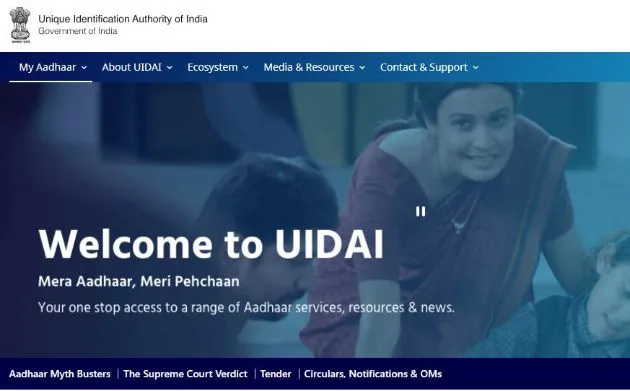
- Mouse over the ‘Contact and Support’ tab
- Now click on ‘Check Complaint Status’
.jpg)
- Proceed further and enter the complaint ID which is already generated earlier.
- Enter the captcha code.
- Now click on the ‘Check Status’
- You can now view the status of your complaint.
Procedure to Lodge Aadhaar Related Complaints through Post
Residents can also file their complaints through the post. They can solve their Aadhaar related issues by proper inquiring and get an answer to their Aadhaar related problems/complaints/issues.
Unique Identification Authority Of India
Government of India Bangla Sahib Road,
Behind Kali Mandir, Gole Market,
New Delhi – 110001
Phone: 011 – 23478653
Regional Office Address in Bangalore
UIDAI Technology Centre,
Aadhaar Complex, NTI Layout,
Tata Nagar, Kodigehalli, Bengaluru – 560092
Phone: 080-23099200
UIDAI Regional Office, Bengaluru
Khanija Bhavan, No. 49, 3rd Floor, South Wing Race Course Road, Bengaluru - 01
Phone: 080-22340104
Fax: 080-22340310
UIDAI Regional Office, Chandigarh
SCO 139-141, 3rd and 4th Floor, Sector 17-C, Chandigarh 160017
Contact: 0172-2711947
Fax: 0172-2711717
Email ID: grievancecell.rochd@uidai.net.in
UIDAI Regional Office, Delhi
Ground Floor, Pragati Maidan Metro Station,
Pragati Maidan, New Delhi-110001
Grievance Cell: 011-40851426
Reception: 11-40851426
Fax: 011-40851406
UIDAI Regional Office, Guwahati
Block-V, First Floor, HOUSEFED Complex,
Beltola-Basistha Road, Dispur, Guwahati – 781 006
Reception: 0361-2221819
Fax: 0361-2265125
Email ID: publicgrievance.cell@uidai.net.in
UIDAI Regional Office, Hyderabad
6th Floor, East Block, Swarna Jayanthi Complex,
Beside Matrivanam, Ameerpet Hyderabad-500 038,
Telangana State
Reception: 040-23739269
General Fax: 040-23736662
Grievance: 040-23739266
UIDAI Regional Office, Lucknow
3rd Floor, Uttar Pradesh Samaj Kalyan Nirman Nigam Building,
TC-46/ V, Vibhuti Khand, Gomti Nagar,
Lucknow- 226 010
Enrolment Related – 0522-2304979
SSUP Related – 0522-2304978
Email ID: uidai.lucknow@uidai.net.in
UIDAI Regional Office, Mumbai
7th Floor, MTNL Exchange, GD Somani Marg,
Cuff Parade, Colaba, Mumbai – 400 005
Grievance Cell Contact No: 1947
UIDAI RO Mumbai Contact No: 022-22163492
Email ID: help@uidai.gov.in
UIDAI Regional Office, Ranchi
1st Floor, RIADA Central Office Building,
Namkum Industrial Area, Near STPI Lowadih,
Ranchi – 834 010
Helpdesk Tel.
No: 9031002292
Helpdesk Email ID: ro.helpdesk@uidai.net.in
Things to be Noted to Retrieve Lost Aadhaar
1. The resident can either get Aadhaar card through online mode by logging on to UIDAI 's official website and thereby select the option “Retrieve lost UID/EID” and they are required to follow the online procedures or the residents can also retrieve their Aadhaar card by visiting nearby Aadhaar Enrollment Centre.
2. The resident should make sure that full name, address and correct mobile number and e-mail ID should be provided at the time of registration of your Aadhaar card both in an online method or offline method.
3. To get an OTP on your registered mobile, it is important to provide a correct mobile number and email address during the process of retrieving your Aadhaar Card through online method.
4. Fill the correct OTP to get your Aadhaar Number on your registered mobile number or e-mail address.
5. The resident can download Aadhaar in a PDF format by providing details like residential address, pin code, etc to the UIDAI 's official website in online method.
Procedure to Retrieve Lost Aadhaar
Existing Aadhaar cardholders and applicants can submit their request to retrieve their lost Aadhaar (UID) Unique Identity Number or EID(Enrollment ID).
Below are the following steps to be followed to retrieve lost Aadhaar through the online method:
Step 1: Visit the official Website of UIDAI.
Step 2: Click on “Retrieve Lost UID/EID option.
Step 3: You can either choose any of below option that is between “Retrieve Aadhaar Number(UID) or Retrieve Aadhaar Enrollment Number(EID).
Step 4: Fill your full name, mobile number or email address in the Aadhaar Enrollment Form.
Step 5: Enter Captcha Verification for the verification purpose.
Step 6: Click on the 'Send OTP' button.
Step 7: After receiving the OTP from your mobile phone number, enter the same OTP for verification purpose.
Step 8: After the verification process, you will receive the Aadhaar number or Enrollment ID into your registered mobile number or Email ID.
FAQs
Q. What are the Required Documents to be Provided to Get Lost Aadhaar UID/EID?
A. Documents are not required to get a lost Aadhaar UID/EID. Only your contact details like mobile number or email address that has been registered with Aadhaar during your enrollment process is required.
Q. What is the fee charged for retrieving Aadhaar number?
A. UIDAI official website offers free of cost service for retrieving an Aadhaar number.
Q. Is it possible to use e-Aadhaar everywhere, when it is required for availing authenticated services?
A. Yes, we can use e-Aadhaar as a valid document for availing authenticated services.
Q. How to unlock the e-Aadhaar card?
A. To unlock e-Aadhaar card you have to use the password. The password used will be a combination of your name and your date of birth. The first 4 characters of the password will be your name and the next will be your year of birth. For example, Name: GOKUL SHARMA, Year of Birth: 1980. Then the password will be GOKU1980.
Latest Updates
- Aadhaar Card Centres in Bangalore
- Aadhaar Card Centres in Chennai
- Aadhaar Card Centres in Delhi
- Aadhaar Card Centres in Mumbai
- Aadhaar Card Centres in Kolkata
- Aadhaar Card Centres in Hyderabad
- Aadhaar Card Centres in Pune
- Aadhaar Card Centres in Vadodara
- Aadhaar Card Centres in Trivandrum
- Aadhaar Card Centres in Jaipur
- Aadhaar Card Centres in Lucknow
- Aadhaar Card Centres in Ahmedabad
- Aadhaar Card Centres in Coimbatore
- Aadhaar Card Centres in Vizianagaram
- Aadhaar Card Centres in Madurai
- Aadhaar Card Centres in Patna
- Aadhaar Card Centres in Nagpur
- Aadhaar Card Centres in Chandigarh
- Aadhaar Card Centres in Surat
- Aadhaar Card Centres in Bhubaneswar
- Aadhaar Card Centres in Mangaluru
- Aadhaar Card Centres in Visakhapatnam
- Aadhaar Card Centres in Nashik
- Aadhaar Card Centres in Mysore
- Aadhaar Card Centres in Indore
- Aadhaar Card Link to Mobile Number
- Linking Aadhaar with Bank Account
- EPF Aadhaar Linking
- Link Aadhaar to LPG
- Linking Aadhaar with PAN Card
- Link Aadhaar to Ration Card
- Aadhaar PVC Card
- How to Link Aadhaar to PM Kisan Samman Nidhi?
- Aadhaar Card Status
- Aadhaar Card Services
- How to Download e- Aadhaar Card through Aadhaar Face Authentication
- Aadhaar Card KYC
- Aadhaar Authentication History
- Aadhaar Card Download
- Aadhaar Enabled Payment Systems
- Link Aadhaar to Mutual Funds
- How to Link Aadhaar with NPS Account
- Aadhaar Card Correction Form
- Procedure to Lock And Unlock Aadhaar Biometrics Data
- Aadhaar For Kids
- mAadhaar
- Aadhaar Card Update
- Aadhaar Virtual ID
- Duplicate Aadhaar Card
- How to link Aadhaar with IRCTC Account?
- UIDAI
- Key Problems Associated with Aadhaar Card
- Linking Aadhaar Card to Different Documents
- Linking Aadhaar with Caste Certificates
- Linking Aadhaar with Driving Licence
- Jio Aadhaar Linking Procedure
- Linking of Aadhaar Number with BSNL Mobile Number
- Procedure to link Aadhaar with LIC Policy
- Procedure to link Aadhaar with SBI Life Insurance Policy
- Linking of Aadhaar Card with Vodafone Number
- Linking of Aadhaar Card with Airtel Number
- Aadhaar Card Customer Care Number
- Procedure to Lodge Aadhaar Related Complaints
- Aadhaar Card For Non-Resident Indians(NRIs)
- Aadhaar Card Application Form
- Seeding Aadhaar Number with Demat Account
- Aadhaar Card Password
- Gold Rate Calculator
- 7th Pay Calculator
- 8th Pay Calculator
- NPS Calculator
- PF Calculator
- Gratuity Calculator
- Income Tax Calculator
- Bank FD Calculator
- Bank RD Calculator
- Bank FD Interest Rate
- Bank RD Interest Rate
- EMI Calculator
- Home Loan EMI Calculator
- Personal Loan EMI Calculator
- Car Loan EMI Calculator
- SIP Calculator
- GST Calculator
-
 Infosys ADR Trading Briefly Halted After Massive 40% Rally, Wipro ADRs Surge; What’s Fueling the Rally?
 -
 Upcoming Dividend Record Date: Canara Robeco Share To Pay 15% Dividend To Shareholders; How To Get Eligible?
 -
 ICICI Prudential vs HDFC vs Nippon Life India: Can The Newly Listed AMC Outshine Its Peers? Check Target Price
 -
 Nagaland Sambad 8 PM Evening Dear Friday Weekly Lottery Result LIVE on 19 December 2025: Check Winners List
 -
 RRP Semiconductor Share Jumps Over 55,000 Per Cent in 20 Months, Triggers Investor Warnings
 -
 How a Year-End Debt Check Help Families Enter New Year Stress-Free
 -
 Buying Apple iPhone 17? Price Hike Rumours Hint at Rs 7,000 Increase in India | What We Know So Far
 -
 No Entry for Non-BS-VI Vehicles in Delhi From Noida, Gurugram, Ghaziabad: How to Check & Renew PUC Certificate
 -
 RBI MPC Minutes: Governor Voted for Rate Cut Considering Benign Inflation, Trade Talks Can Boost Growth
 -
 It’s A Boy For Bharti Singh, Haarsh Limbachiyaa! Couple Welcomes Baby After On-Set Emergency ; Check Net Worth
-
Block for 8 hours
-
Block for 12 hours
-
Block for 24 hours
-
Don't block

 Sign in with Google
- Male
- Female
- Others
- Under 18
- 18 to 25
- 26 to 35
- 36 to 45
- 45 to 55
- 55+