


 Click it and Unblock the Notifications
Aadhaar Card KYC
The term KYC refers to the “Know Your Customer”.It is a process of a business which helps in verifying the identity of its clients and assess their suitability, along with identifying the potential risks of illegal intentions towards the business relationship, if any. The Aadhaar Card KYC is one of the basic yet compulsory processes which is essential for all the financial institutions and mobile connections. Since Aadhaar card can be used as both identity card and address proof, one need not have to provide multiple documents under each identification categories. Aadhaar Card is a small but effective document for this process.
Although aadhaar card can be used as a KYC document, the entire KYC process will take a relatively long period of time to complete the due documentation process. The UIDAI has come up with E-KYC services, which can be used by the customer to go through the electronic verification of their identity and thus reducing the time spent on completing the process physically while opening a bank account or while applying for a new mobile connection or for opening a new trading account and so on.
Aadhaar Based e-KYC
The aadhaar based e-KYC (an electronic form of Know Your Customer) is offered by the UIDAI.
It can be used voluntarily by the aadhaar cardholders as a means to authenticate and establish their identity. The e-KYC is the way of resident authentication which allows the Indian residents to submit the same as an address proof in the electronic mode to all the banking companies. As e-KYC can be submitted via an online platform, the need for physical document submission is negated.
As per the existing system, the UIDAI has made a provision for aadhaar authentication through both online and paperless offline mode.
Aadhaar Authentication and e-KYC Services
The term aadhaar authentication refers to the process by which the aadhaar number, the demographic and biometric details of an aadhaar cardholder will be submitted to the Central Identities Data Repository (CIDR) for the verification purpose and such repository verifies the correctness or the lack of it thereof, based on the available information with it. The main aim of authentication is to enable the Indian residents to provide their identity for the service provider (for banks) to provide services and to give access to the benefits.
Advantages of Aadhaar Authentication / e-KYC Services
The following are the advantages of aadhaar authentication/ e-KYC services:
- The online e-KYC is an instant authenticated verification process which is simple yet faster.
- It is a safe and secure method to share confidential information with relevant KUA’s.
- As the information is shared via UIDAI’s internal encrypted software, the piracy and security of the data are guaranteed.
- Since the process is done online, there are minimal costs involved as compared with the paper-based verification process.
Aadhaar Paperless Offline e-KYC
The aadhaar paperless offline e-KYC will eliminate all the need for resident Indians to provide a photocopy of Aadhaar letter and instead they can download the KYC XML and provide the same to the agencies who wanted to have his or her aadhaar KYC. The aadhaar KYC details are machine-readable XML which is digitally signed by the UIDAI and it allows the agencies to verify the authenticity and detect any tampering. The agency can also authenticate the user using their own OTP or face authentication mechanisms.
Information in Aadhaar Offline e-KYC Data
At the time of downloading or obtaining the offline e-KYC data, the following fields will be included in the XML. They include:
- Resident’s Name
- Address
- Download Reference Number
- Gender
- Photo
- Date of Birth / Year of Birth
- E-mail (in hashed form)
- Mobile Number (in hashed form)
The Aadhaar Paperless Offline e-KYC data is encrypted using a “Share Phrase” which is provided by the aadhaar number holder at the time of downloading and the same can be shared with the agencies to read KYC data.
Advantages of Offline Aadhaar e-KYC
The following are the advantages of using Aadhaar e-KYC through offline mode.
- Biometrics are not required to verify the data that is being shared in case of offline aadhaar e-KYC.
- Accessibility: The e-KYC data can be shared by the aadhaar cardholder directly without any need for repeated requests to the UIDAI for access.
- Reliability: As the e-KYC information is accessed from the master UIDAI database, all the data provided is as per the government records and hence it is tamper-proof.
- Privacy: The information which is relevant to the KUA and the holder’s KYC requirements are shared through the system thus ensuring the holder’s privacy.
- Voluntary: This is a voluntary service and an aadhaar holder can choose if he/she wants to share the KYC details through the platform.
- Security: The data which is shared with the KUA is encrypted in nature, thus preventing any misuse of the aadhaar holder’s information.
- Aadhaar Related Security: Whenever a KUA requests KYC data, the holder’s aadhaar number will not be shared, instead a reference ID is generated. The reference ID will be used to complete the process, thus ensuring the protection of data.
How Does the Aadhaar Offline e-KYC Work?
The offline e-KYC process is a convenient and easy way for the aadhaar holders to provide their KYC details for authentication. As an aadhaar cardholder, one can download an XML file and provide the same to the relevant requesting agencies. The XML is verified by the UIDAI and is tamper-proof, which further secures the data from either being shared or misused.
Procedure to Access Aadhaar Paperless e-KYC
Those who already have an aadhaar card can access their paperless e-KYC data by following the below-mentioned steps:
Step 1: Visit the official web portal of UIDAI
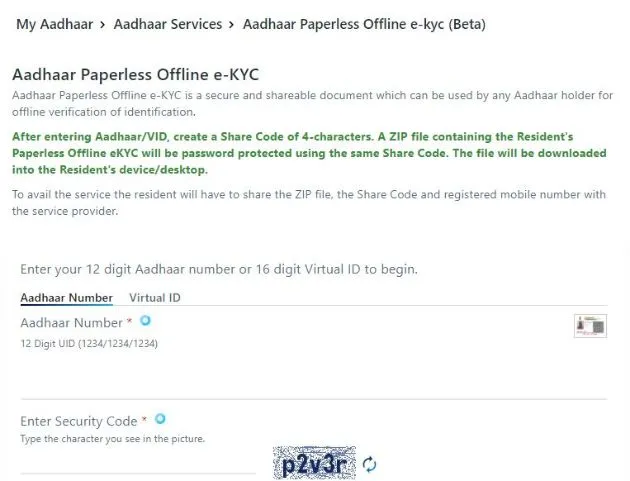
Step 2: Select the Aadhaar Paperless Offline e-KYC (Beta) option under Aadhaar Services
Step 3: Enter the 12 digit Aadhaar number or Virtual ID followed by Security Code
Step 4: Select either Send OTP or Enter TOTP option, for verification purpose
Step 5: Now download the Aadhaar Paperless Offline e-KYC form
Step 6: Duly fill in all the required details as mentioned in the form and submit the same
Step 7: The relevant information will be available for download as an XML file, which will be digitally signed by the UIDAI.
Procedure to Share Offline e-KYC Data
The aadhaar cardholder should first download the offline e-KYC data which can be shared with the relevant requesting agency either in the physical format or through digitally.
The ‘Share Phrase’ has to be provided to the authority or agency at this time since the data is encrypted.
In the case of high-resolution copies, it is preferred to share the information via XML or PDF file format.
About KYC
The term KYC stands for Know Your Client. It mainly deals with the process of a business verifying the identity of the clients and assessing the suitability. It also involves potential risks of illegal intentions towards the business relationship. It is more often used to refer to the bank regulations and anti-money laundering regulation which govern these activities. The process is also carried out by most of the companies in India irrespective of their sizes for all the purposes to ensure their proposed customers, agents, consultants, distributors and so on are anti-bribery compliant. Most of the banks, financial institutions, insurers, export creditors are increasingly demanding that customers should provide detailed due diligence information in KYC. The main objective of following the KYC guidelines is to prevent the banks and financial institutions from being used intentionally or unintentionally by criminal elements for money laundering activities. All the due related procedures will help the banks to better understand their customers and all the related financial transactions of their customers.
FAQ's
Q: How can residents raise the demand to request a reprint of the Aadhaar card?
ANS: The Aadhaar Reprint Order Request can be issued by visiting the official Unique Identification Authority of India(UIDAI) website by using a 12-digit Aadhaar number (UID) or a 16-digit virtual identification number (VID). The OTP / TOTP will be received on the registered mobile number. Alternative / unregistered mobile number. Also, you can download the Aadhaar card without OTP by using face authentication.
Q: What is SRN?
ANS: The SRN is a 28-digit service request number that is generated after issuing an Aadhaar order reprint request on the UIDAI website. It will be generated every time the request is issued, regardless of whether the payment was successful or not.
Q: What is the AWB number?
ANS: AWB(Airway Bill Number) is the tracking number generated by DoP(Department of Postoffice) i.e India Speed Post for the assignment/product they are delivering.
Q: Do we have the option to request a reprint of Order Aadhaar at a different address?
ANS: If you want to ship your Aadhaar reprint order to a different address, you must first update your Aadhaar information by visiting the nearest registration center or online through the SSUP portal.
Q: How can a resident download e-Aadhaar?
ANS: The resident can download an e-Aadhaar by following two methods.
Using the registration number: The resident can download an e-Aadhaar using the 28 digit registration number. as well as the full name and PIN code. You will receive the OTP on the registered mobile number. The resident also can provide the TOTP which is generated by mAadhaar mobile application to download e-Aadhaar instead of OTP.
Using Aadhaar No: Resident can download e-Aadhaar using 12 digits of Aadhaar No, as well as full name and PIN code. The OTP will be sent to your registered mobile number. The resident can also use TOTP to download e-Aadhaar instead of OTP by using your registered mobile number.
Q: What is an e-Aadhaar?
ANS: e-Aadhaar protected with 8 digit password, which is digitally signed by the relevant authority of the UIDAI.
Q: What is the expiration period of the VID?
ANS: At this time, no expiration period is set for VID. The VID will be valid until a new VID is generated by the holder of the Aadhaar number.
Q: Will regenerating VID lead to the same VID or a different VID?
ANS: After the minimum validity period (currently defined as 1 calendar day), on regeneration requests from the holder of the Aadhaar number, a new VID will be generated and the old VID will be deactivated.
If the resident opts for the recovery of the VID, the last active VID will be sent to the holder of the Aadhaar number.
Q: Can an agency store VID?
ANS: No. Since the VID is temporary and can be changed by the holder of the Aadhaar number, the storage of the VID has no value. Agencies should not store the VID in a database or logs.
Q: In the case of VID, do I need to provide consent for authentication?
ANS: Yes, Aadhaar number holder consent is required for VID based authentication. The agency is required to inform the holder of the Aadhaar number of the purpose of authentication and to obtain explicit consent to perform the authentication.
Q: Can Aadhaar be downloaded even if my mobile phone number is not registered with UIDAI?
ANS: No, your Aadhaar cannot be downloaded if your mobile phone number is not registered with UIDAI.
Q. What is a masked Aadhaar card?
ANS: This is the last option for citizens to hide their Aadhaar cards in the downloaded e-Aadhaar where the first 8 digits are replaced with characters like "XXXX-XXXX" and only show the last four digits of the Aadhaar number.
Q. Can I download my e-Aadhaar using a registration ID and virtual ID?
ANS: If you forgot your Aadhaar number, you can download your e-Aadhaar using the registration ID and virtual ID.
Q. What is the official UIDAI website to download the Aadhaar card?
ANS: To download Aadhaar pdf, you can visit the UIDAI official website.
Q. Does Umang APP support IOS and Android devices to download Aadhaar card?
ANS: Yes, Umang APP supports IOS and Android devices to download Aadhaar card.
Q. Are Aadhaar Card and e-Aadhaar considered the same?
ANS: Yes, the Aadhaar and e-Aadhaar card are also valid. The Aadhaar card is mailed to applicants by UIDAI, while e-Aadhaar applicants must download it through the UIDAI website.
Latest Updates
- Aadhaar Card Centres in Bangalore
- Aadhaar Card Centres in Chennai
- Aadhaar Card Centres in Delhi
- Aadhaar Card Centres in Mumbai
- Aadhaar Card Centres in Kolkata
- Aadhaar Card Centres in Hyderabad
- Aadhaar Card Centres in Pune
- Aadhaar Card Centres in Vadodara
- Aadhaar Card Centres in Trivandrum
- Aadhaar Card Centres in Jaipur
- Aadhaar Card Centres in Lucknow
- Aadhaar Card Centres in Ahmedabad
- Aadhaar Card Centres in Coimbatore
- Aadhaar Card Centres in Vizianagaram
- Aadhaar Card Centres in Madurai
- Aadhaar Card Centres in Patna
- Aadhaar Card Centres in Nagpur
- Aadhaar Card Centres in Chandigarh
- Aadhaar Card Centres in Surat
- Aadhaar Card Centres in Bhubaneswar
- Aadhaar Card Centres in Mangaluru
- Aadhaar Card Centres in Visakhapatnam
- Aadhaar Card Centres in Nashik
- Aadhaar Card Centres in Mysore
- Aadhaar Card Centres in Indore
- Aadhaar Card Link to Mobile Number
- Linking Aadhaar with Bank Account
- EPF Aadhaar Linking
- Link Aadhaar to LPG
- Linking Aadhaar with PAN Card
- Link Aadhaar to Ration Card
- Aadhaar PVC Card
- How to Link Aadhaar to PM Kisan Samman Nidhi?
- Aadhaar Card Status
- Aadhaar Card Services
- How to Download e- Aadhaar Card through Aadhaar Face Authentication
- Aadhaar Card KYC
- Aadhaar Authentication History
- Aadhaar Card Download
- Aadhaar Enabled Payment Systems
- Link Aadhaar to Mutual Funds
- How to Link Aadhaar with NPS Account
- Aadhaar Card Correction Form
- Procedure to Lock And Unlock Aadhaar Biometrics Data
- Aadhaar For Kids
- mAadhaar
- Aadhaar Card Update
- Aadhaar Virtual ID
- Duplicate Aadhaar Card
- How to link Aadhaar with IRCTC Account?
- UIDAI
- Key Problems Associated with Aadhaar Card
- Linking Aadhaar Card to Different Documents
- Linking Aadhaar with Caste Certificates
- Linking Aadhaar with Driving Licence
- Jio Aadhaar Linking Procedure
- Linking of Aadhaar Number with BSNL Mobile Number
- Procedure to link Aadhaar with LIC Policy
- Procedure to link Aadhaar with SBI Life Insurance Policy
- Linking of Aadhaar Card with Vodafone Number
- Linking of Aadhaar Card with Airtel Number
- Aadhaar Card Customer Care Number
- Procedure to Lodge Aadhaar Related Complaints
- Aadhaar Card For Non-Resident Indians(NRIs)
- Aadhaar Card Application Form
- Seeding Aadhaar Number with Demat Account
- Aadhaar Card Password
- Gold Rate Calculator
- 7th Pay Calculator
- 8th Pay Calculator
- NPS Calculator
- PF Calculator
- Gratuity Calculator
- Income Tax Calculator
- Bank FD Calculator
- Bank RD Calculator
- Bank FD Interest Rate
- Bank RD Interest Rate
- EMI Calculator
- Home Loan EMI Calculator
- Personal Loan EMI Calculator
- Car Loan EMI Calculator
- SIP Calculator
- GST Calculator
-
 Infosys ADR Trading Briefly Halted After Massive 40% Rally, Wipro ADRs Surge; What’s Fueling the Rally?
 -
 Upcoming Dividend Record Date: Canara Robeco Share To Pay 15% Dividend To Shareholders; How To Get Eligible?
 -
 ICICI Prudential vs HDFC vs Nippon Life India: Can The Newly Listed AMC Outshine Its Peers? Check Target Price
 -
 Nagaland Sambad 8 PM Evening Dear Friday Weekly Lottery Result LIVE on 19 December 2025: Check Winners List
 -
 RRP Semiconductor Share Jumps Over 55,000 Per Cent in 20 Months, Triggers Investor Warnings
 -
 How a Year-End Debt Check Help Families Enter New Year Stress-Free
 -
 Buying Apple iPhone 17? Price Hike Rumours Hint at Rs 7,000 Increase in India | What We Know So Far
 -
 No Entry for Non-BS-VI Vehicles in Delhi From Noida, Gurugram, Ghaziabad: How to Check & Renew PUC Certificate
 -
 RBI MPC Minutes: Governor Voted for Rate Cut Considering Benign Inflation, Trade Talks Can Boost Growth
 -
 It’s A Boy For Bharti Singh, Haarsh Limbachiyaa! Couple Welcomes Baby After On-Set Emergency ; Check Net Worth
-
Block for 8 hours
-
Block for 12 hours
-
Block for 24 hours
-
Don't block

 Sign in with Google
- Male
- Female
- Others
- Under 18
- 18 to 25
- 26 to 35
- 36 to 45
- 45 to 55
- 55+