


 Click it and Unblock the Notifications
Aadhaar Card Password
The aadhaar card mainly contains 12 digit unique identification number known as the aadhaar number. This number is unique for every resident Indian. An aadhaar card comprises of an individual's biometric and demographic details. The Aadhaar project is being carried out by the Unique Identification Authority of India (UIDAI).
To ensure safety and privacy of all the aadhaar cardholders while using it in online mode, the UIDAI has protected the aadhaar with a password. Once the e-aadhaar card is downloaded from the official web portal of UIDAI, it will ask the user to provide a password to unlock the PDF format file. The password contains 8 characters. These 8 characters password will start with your name and then will end with your date of birth. The first four letters of the password will start with your name that will be mentioned in your Aadhaar card and which will be in capital letter and then the next four letters will be your year of birth.
For example: if your is RADHIKA ACHARYA and year of birth is 1991. Then your E-Aadhaar password will be RADH1991
Importance of Password in E-Aadhaar
Password is one of the efficient ways of protecting any significant information.
Hence UIDAI protects Aadhaar Card efficiently through passwords. Moreover, E-Aadhaar card is in the PDF file format which is safe and secured. As PDF is considered to be a secured, useful and protected digital file format, one can be assured that their data with Aadhaar is safe. Moreover, the password has a length 8 letter characters and it is difficult for hackers to hack it.
Benefits of E-Aadhaar:
- An E-Aadhaar can be found in the UIDAI' s official website, and it is easy to download with a few steps.
- The person can easily download an E-Aadhaar card through UIDAI link if in case it is stolen or misplaced.
- If there are any changes that you want to update and revise in Aadhaar card, then there is no need to visit the UIDAI authorized centre to get an updated Aadhaar card. One can download the latest version of Aadhaar card anywhere and anytime through E-Aadhaar card by visiting UIDAI official website.
- E-Aadhaar card is PDF file and password protected. It is the combination of your name and your date of birth. So it is considered to be safe to a certain extent.
- Aadhaar linked bank account will get many monetary benefits and govt subsidy scheme benefits will be directly credited to your bank accounts.
Some of the other facilities include unemployment benefit scheme, public subsidy scheme, domestic LPG, MGNREGA (Mahatma Gandhi National Rural Employment Guarantee Act) and crop insurance scheme.
- People having Aadhaar can apply for a passport and get it within one or two weeks. As per the proposed new rule, the Ministry of External Affairs wants to link the individual's Aadhaar with their respective passports.
- To regulate our attendance, Biometric Attendance system is being planned to be linked to an individual's Aadhaar card.
- To eliminate fake voters, Election Commission of India is planning to link electors photo ID card with their Aadhaar number.
- EPFO (Employees Provident Fund Organization of India) has started to link Provident Funds accounts to Aadhaar cardholders to get accurate pensions.
- To prevent fake ration card, now Aadhaar card is also been linked to ration cards in some states like Telangana.
Procedure to Download and print E-Aadhaar
Step1: Log on to UIDAI website
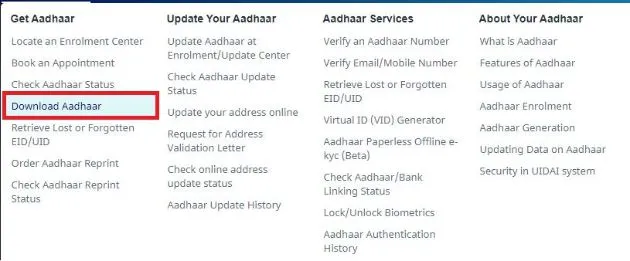
Step 2: Mouse over 'My Aadhaar' option and choose 'Download Aadhaar'. Proceed further and go to the personal details section, select one of the options given that is either you can select Enrollment ID or Aadhaar according to the details you have. You can find Enrollment ID along with date stamp and another option is Aadhaar where you have to fill the Aadhaar number.
Step 3: If you have Enrollment ID, then fill your 14 digit Enrollment number with a date stamp in the first row, which is present in the acknowledgement slip provided to you after the completion of the enrollment process. If you select Aadhaar then fill in your Aadhaar number which consists 12 digits.
Step 4: Make sure that you fill your full name that is as mentioned in the Aadhaar card.
Step 5: Then enter Pin code of the postal address in the next row.
Step 6: Next step is to enter Image text which is displayed in a row below.
Step 7: Then enter your mobile number which is registered with Aadhaar.
Step 8: Now you will receive an OTP on your registered mobile number.
Step 9: Enter OTP received and download your E-Aadhaar and click on Validate and Download tab
Step 10: Now PDF file will be shown to you to Download.
FAQ's
Q: What is E-Aadhaar's PDF file password format?
A: It is a combination of your name and date of birth. That is, the first four letters will be named in capital letters and another four letters contains your date of birth.
Q. Is it necessary to provide Aadhaar card password to apply for credit card and a personal loan?
A: Yes, it is necessary to provide Aadhaar card password at the time of applying for credit card and personal loan.
Latest Updates
- Aadhaar Card Centres in Bangalore
- Aadhaar Card Centres in Chennai
- Aadhaar Card Centres in Delhi
- Aadhaar Card Centres in Mumbai
- Aadhaar Card Centres in Kolkata
- Aadhaar Card Centres in Hyderabad
- Aadhaar Card Centres in Pune
- Aadhaar Card Centres in Vadodara
- Aadhaar Card Centres in Trivandrum
- Aadhaar Card Centres in Jaipur
- Aadhaar Card Centres in Lucknow
- Aadhaar Card Centres in Ahmedabad
- Aadhaar Card Centres in Coimbatore
- Aadhaar Card Centres in Vizianagaram
- Aadhaar Card Centres in Madurai
- Aadhaar Card Centres in Patna
- Aadhaar Card Centres in Nagpur
- Aadhaar Card Centres in Chandigarh
- Aadhaar Card Centres in Surat
- Aadhaar Card Centres in Bhubaneswar
- Aadhaar Card Centres in Mangaluru
- Aadhaar Card Centres in Visakhapatnam
- Aadhaar Card Centres in Nashik
- Aadhaar Card Centres in Mysore
- Aadhaar Card Centres in Indore
- Aadhaar Card Link to Mobile Number
- Linking Aadhaar with Bank Account
- EPF Aadhaar Linking
- Link Aadhaar to LPG
- Linking Aadhaar with PAN Card
- Link Aadhaar to Ration Card
- Aadhaar PVC Card
- How to Link Aadhaar to PM Kisan Samman Nidhi?
- Aadhaar Card Status
- Aadhaar Card Services
- How to Download e- Aadhaar Card through Aadhaar Face Authentication
- Aadhaar Card KYC
- Aadhaar Authentication History
- Aadhaar Card Download
- Aadhaar Enabled Payment Systems
- Link Aadhaar to Mutual Funds
- How to Link Aadhaar with NPS Account
- Aadhaar Card Correction Form
- Procedure to Lock And Unlock Aadhaar Biometrics Data
- Aadhaar For Kids
- mAadhaar
- Aadhaar Card Update
- Aadhaar Virtual ID
- Duplicate Aadhaar Card
- How to link Aadhaar with IRCTC Account?
- UIDAI
- Key Problems Associated with Aadhaar Card
- Linking Aadhaar Card to Different Documents
- Linking Aadhaar with Caste Certificates
- Linking Aadhaar with Driving Licence
- Jio Aadhaar Linking Procedure
- Linking of Aadhaar Number with BSNL Mobile Number
- Procedure to link Aadhaar with LIC Policy
- Procedure to link Aadhaar with SBI Life Insurance Policy
- Linking of Aadhaar Card with Vodafone Number
- Linking of Aadhaar Card with Airtel Number
- Aadhaar Card Customer Care Number
- Procedure to Lodge Aadhaar Related Complaints
- Aadhaar Card For Non-Resident Indians(NRIs)
- Aadhaar Card Application Form
- Seeding Aadhaar Number with Demat Account
- Aadhaar Card Password
- Gold Rate Calculator
- 7th Pay Calculator
- 8th Pay Calculator
- NPS Calculator
- PF Calculator
- Gratuity Calculator
- Income Tax Calculator
- Bank FD Calculator
- Bank RD Calculator
- Bank FD Interest Rate
- Bank RD Interest Rate
- EMI Calculator
- Home Loan EMI Calculator
- Personal Loan EMI Calculator
- Car Loan EMI Calculator
- SIP Calculator
- GST Calculator
-
 Infosys ADR Trading Briefly Halted After Massive 40% Rally, Wipro ADRs Surge; What’s Fueling the Rally?
 -
 Upcoming Dividend Record Date: Canara Robeco Share To Pay 15% Dividend To Shareholders; How To Get Eligible?
 -
 ICICI Prudential vs HDFC vs Nippon Life India: Can The Newly Listed AMC Outshine Its Peers? Check Target Price
 -
 Nagaland Sambad 8 PM Evening Dear Friday Weekly Lottery Result LIVE on 19 December 2025: Check Winners List
 -
 RRP Semiconductor Share Jumps Over 55,000 Per Cent in 20 Months, Triggers Investor Warnings
 -
 How a Year-End Debt Check Help Families Enter New Year Stress-Free
 -
 Buying Apple iPhone 17? Price Hike Rumours Hint at Rs 7,000 Increase in India | What We Know So Far
 -
 No Entry for Non-BS-VI Vehicles in Delhi From Noida, Gurugram, Ghaziabad: How to Check & Renew PUC Certificate
 -
 RBI MPC Minutes: Governor Voted for Rate Cut Considering Benign Inflation, Trade Talks Can Boost Growth
 -
 It’s A Boy For Bharti Singh, Haarsh Limbachiyaa! Couple Welcomes Baby After On-Set Emergency ; Check Net Worth
-
Block for 8 hours
-
Block for 12 hours
-
Block for 24 hours
-
Don't block

 Sign in with Google
- Male
- Female
- Others
- Under 18
- 18 to 25
- 26 to 35
- 36 to 45
- 45 to 55
- 55+