


 Click it and Unblock the Notifications
Procedure to Lock And Unlock Aadhaar Biometrics Data
The introduction of Aadhaar has helped individuals to use is as a credible government document as it acts as a valid identification proof as well as proof of address. But, off recently, the security of Aadhaar has come under scrutiny which has prompted the UIDAI to take necessary steps to safeguard the data and hence the option to lock or unlock the aadhaar biometric data online was introduced. This feature will help the users to protect their biometric details from being misused by fraudsters.
There are two ways through which aadhaar users can lock and unlock their aadhaar biometric data online:
- Via UIDAI’s portal
- mAadhaar applicant
Procedure to Lock/ Unlock/ Disable Biometric Details Online via UIDAI Portal
Step 1: Visit the official web portal of UIDAI
Step 2: Mouse over ‘My Aadhaar’ option
Step 3: Now select the “Lock/Unlock Biometrics” under the Aadhaar Services subhead
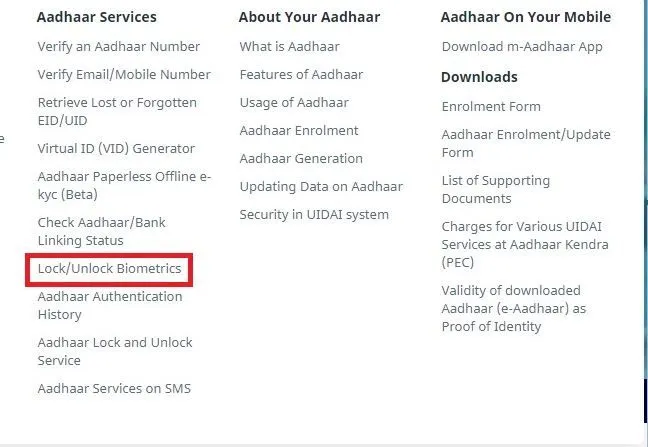
Step 4: Enter the 12 digit aadhaar number followed by the security code
Step 5: Click on the Send OTP option
Step 6: You will receive an OTP on your registered mobile number with Aadhaar
Step 7: Proceeding further, enter the OTP which you receive on your mobile number and click on the login button.
Step 8: This feature will allow you to Lock your biometrics
Step 9: Now enter the 4 digit security code as mentioned on the screen and click on the ‘Enable’ button.
Step 10: Now your biometrics details will get locked and you will have to unlock it if you want to access it again.
Step 11: One can even unlock their biometrics. To do so, click on the “Login” button.
Step 12: Enter your aadhaar number followed by the security code in the space
Step 13: Click on the “Send OTP” button.
Step 14: An OTP will be sent to the registered mobile number which is linked to Aadhaar.
Step 15: Now enter the OTP and click on the ‘Login’ button.
Step 16: If in case, you want to temporarily unlock the biometric details, then enter the security code and click the “Unlock” button.
Step 17: Your biometric details will be unlocked temporarily for 10 minutes.
Step 18: The locking date and time will be mentioned on the screen after which biometrics will automatically get locked.
Please Note:
- If an Aadhaar holder wishes not to lock their biometrics then they can disable the lock permanently.
- The biometric lock disabling system is available to the users only via the online portal.
- To disable the lock, one has to login to the UIDAI web portal using the Aadhaar card number followed by security code and click on the ‘Disable’ button. Your Aadhaar biometric details will be displayed permanently until you lock it again.
Procedure to Lock/Unlock Biometrics through mAadhaar
Step 1: Download and install the mAadhaar App to lock/unlock your biometric details.
.jpg)
Step 2: Add your profile in the app.
Step 3: Open your aadhaar profile in the app.
Step 4: On the top right corner of the app, click on the three vertical dots.
Step 5: Select the biometric settings option.
Step 6: Select the Biometric Locking option by ticking the same
Step 7: Proceeding further, click on the tick mark.
Step 8: An OTP will be requested from your mobile number.
Step 9: UIDAI will send the OTP to your registered Aadhaar mobile number.
Step 10: The OTP will be fed automatically in the application.
Step 11: Now, your biometric details will get locked after you approve the task.
Please Note: It usually takes up to 6 hours to activate the Biometric Lock.
If an individual have to verify Aadhaar using the biometrics details, then they can unlock their biometric details using the mAadhaar App by following the below-mentioned procedure.
Step 1: Login to your mAadhaar app.
Step 2: Open your respective profile in the app.
Step 3: Click on the three vertical dots which is present on the top right corner of the app
Step 4: Now Select the Biometric Settings option
Step 5: Unselect the Enable Biometric Locking option
Step 6: Proceeding further, now click on the tick mark to complete the process.
Step 7: An OTP will be sent and fed automatically in the app.
Step 8: Now you will have to approve the process to proceed further.
Step 9: Post-approval, your biometric details will be unlocked temporarily for 10 minutes.
Step 10: During this time one can authenticate using the biometric details.
Step 11: Your biometric details will get locked automatically after 10 minutes.
Please Note: There is no provision to disable the biometric lock using mAadhaar app. If one wishes to do so, then they will have to log in to the UIDAI’s web portal to disable the biometric lock.
Features of Aadhaar Biometric Locking
- The biometric locking is introduced by the UIDAI to prevent the misuse of biometric authentication.
- Under this service of aadhaar, the user’s iris scan and fingerprints are locked.
- The biometric lock can be unlocked temporarily for authentication purpose.
- When unlocked, the user will get a window time of 10 minutes for checking the authentication of his/her biometric details.
- The biometric authentication is not possible after the time gap of 10 minutes, as the data gets locked automatically.
- If in case, the user does not want to keep the biometrics details locked, then they can disable it.
- Until the user unlocks or disables the biometric details, authentication is not possible through the biometric method.
- To protect the biometric details from getting hacked, individuals have to lock their biometrics.
- It is mandatory to link your mobile number with Aadhaar to avail this facility.
- If your mobile number is not registered with UIDAI, then you will not be able to utilize this service.
- There will be no fee charged to lock, unlock or disable the biometric lock.
About Biometrics Locking
Any Indian resident, who has a valid Aadhaar card should be able to use the services of locking the biometric details. The features empower the aadhaar users to lock their biometrics. Post locking Biometrics, if a UID is used for invoking any of the authentication services using the biometric modality be it fingerprint or iris scan a specific code 330 which indicates biometrics will be locked.
The fingerprint and iris data of the resident’s Aadhaar which will be captured at the time of enrollment for authentication purpose can be locked. When the biometric details are locked, the aadhaar holders will not be able to use their biometrics (both iris or fingerprint) for authentication. The locking of biometric details aims to strengthen the privacy and confidentiality of the resident’s biometrics data.
FAQ's
Q: I have not received my Aadhaar card. What should I do?
ANS. You can download the Aadhaar card online from the official UIDAI website if you know your Aadhaar number. You can also visit the Aadhaar Enrollment Center to get a printout of your Aadhaar card.
Q. What if OTP for Aadhaar services is not received on your mobile number?
ANS. You can verify your mobile number associated with Aadhaar. If the number mentioned in Aadhaar is not the same, you can update it by visiting a nearby Aadhaar registration centre.
Q. How many days will it take for the Aadhaar card to be received at the applicant's home address?
ANS. The Aadhaar card is received at the applicant's residential address within 90 days of enrolling in Aadhaar.
Q. Can I get a copy of my Aadhaar card after I update my name or address?
ANS.
You can instead download the updated e-Aadhaar as soon as the data is corrected in your Aadhaar. It's easy and instant and you can download it as many times as you want.
Q. I updated the address on the Aadhaar map. Will UIDAI send an updated Aadhaar map by post?
ANS: UIDAI sends the Aadhaar card by post in case you have updated your address, name, gender or date of birth.
Latest Updates
- Aadhaar Card Centres in Bangalore
- Aadhaar Card Centres in Chennai
- Aadhaar Card Centres in Delhi
- Aadhaar Card Centres in Mumbai
- Aadhaar Card Centres in Kolkata
- Aadhaar Card Centres in Hyderabad
- Aadhaar Card Centres in Pune
- Aadhaar Card Centres in Vadodara
- Aadhaar Card Centres in Trivandrum
- Aadhaar Card Centres in Jaipur
- Aadhaar Card Centres in Lucknow
- Aadhaar Card Centres in Ahmedabad
- Aadhaar Card Centres in Coimbatore
- Aadhaar Card Centres in Vizianagaram
- Aadhaar Card Centres in Madurai
- Aadhaar Card Centres in Patna
- Aadhaar Card Centres in Nagpur
- Aadhaar Card Centres in Chandigarh
- Aadhaar Card Centres in Surat
- Aadhaar Card Centres in Bhubaneswar
- Aadhaar Card Centres in Mangaluru
- Aadhaar Card Centres in Visakhapatnam
- Aadhaar Card Centres in Nashik
- Aadhaar Card Centres in Mysore
- Aadhaar Card Centres in Indore
- Aadhaar Card Link to Mobile Number
- Linking Aadhaar with Bank Account
- EPF Aadhaar Linking
- Link Aadhaar to LPG
- Linking Aadhaar with PAN Card
- Link Aadhaar to Ration Card
- Aadhaar PVC Card
- How to Link Aadhaar to PM Kisan Samman Nidhi?
- Aadhaar Card Status
- Aadhaar Card Services
- How to Download e- Aadhaar Card through Aadhaar Face Authentication
- Aadhaar Card KYC
- Aadhaar Authentication History
- Aadhaar Card Download
- Aadhaar Enabled Payment Systems
- Link Aadhaar to Mutual Funds
- How to Link Aadhaar with NPS Account
- Aadhaar Card Correction Form
- Procedure to Lock And Unlock Aadhaar Biometrics Data
- Aadhaar For Kids
- mAadhaar
- Aadhaar Card Update
- Aadhaar Virtual ID
- Duplicate Aadhaar Card
- How to link Aadhaar with IRCTC Account?
- UIDAI
- Key Problems Associated with Aadhaar Card
- Linking Aadhaar Card to Different Documents
- Linking Aadhaar with Caste Certificates
- Linking Aadhaar with Driving Licence
- Jio Aadhaar Linking Procedure
- Linking of Aadhaar Number with BSNL Mobile Number
- Procedure to link Aadhaar with LIC Policy
- Procedure to link Aadhaar with SBI Life Insurance Policy
- Linking of Aadhaar Card with Vodafone Number
- Linking of Aadhaar Card with Airtel Number
- Aadhaar Card Customer Care Number
- Procedure to Lodge Aadhaar Related Complaints
- Aadhaar Card For Non-Resident Indians(NRIs)
- Aadhaar Card Application Form
- Seeding Aadhaar Number with Demat Account
- Aadhaar Card Password
- Gold Rate Calculator
- 7th Pay Calculator
- 8th Pay Calculator
- NPS Calculator
- PF Calculator
- Gratuity Calculator
- Income Tax Calculator
- Bank FD Calculator
- Bank RD Calculator
- Bank FD Interest Rate
- Bank RD Interest Rate
- EMI Calculator
- Home Loan EMI Calculator
- Personal Loan EMI Calculator
- Car Loan EMI Calculator
- SIP Calculator
- GST Calculator
-
 Infosys ADR Trading Briefly Halted After Massive 40% Rally, Wipro ADRs Surge; What’s Fueling the Rally?
 -
 Upcoming Dividend Record Date: Canara Robeco Share To Pay 15% Dividend To Shareholders; How To Get Eligible?
 -
 ICICI Prudential vs HDFC vs Nippon Life India: Can The Newly Listed AMC Outshine Its Peers? Check Target Price
 -
 Nagaland Sambad 8 PM Evening Dear Friday Weekly Lottery Result LIVE on 19 December 2025: Check Winners List
 -
 RRP Semiconductor Share Jumps Over 55,000 Per Cent in 20 Months, Triggers Investor Warnings
 -
 How a Year-End Debt Check Help Families Enter New Year Stress-Free
 -
 Buying Apple iPhone 17? Price Hike Rumours Hint at Rs 7,000 Increase in India | What We Know So Far
 -
 No Entry for Non-BS-VI Vehicles in Delhi From Noida, Gurugram, Ghaziabad: How to Check & Renew PUC Certificate
 -
 RBI MPC Minutes: Governor Voted for Rate Cut Considering Benign Inflation, Trade Talks Can Boost Growth
 -
 It’s A Boy For Bharti Singh, Haarsh Limbachiyaa! Couple Welcomes Baby After On-Set Emergency ; Check Net Worth
-
Block for 8 hours
-
Block for 12 hours
-
Block for 24 hours
-
Don't block

 Sign in with Google
- Male
- Female
- Others
- Under 18
- 18 to 25
- 26 to 35
- 36 to 45
- 45 to 55
- 55+