


 Click it and Unblock the Notifications
Aadhaar Card Update
The UIDAI has made it easy and accessible for the people for aadhaar card updated or corrected via both online and offline platform. The holders of aadhaar cards can update their residential address, mobile number, date of birth and email id on the aadhaar card. The following are the steps or procedure for getting the e-Aadhaar card details updated and corrected.
UIDAI Aadhaar Update Online
Step 1: Visit the UIDAI web portal
Step 2: Mouse over “My Aadhaar” option on the main page
Step 3: Proceeding further select the option ‘Update your address online’ under the heading ‘Update Your Aadhaar’
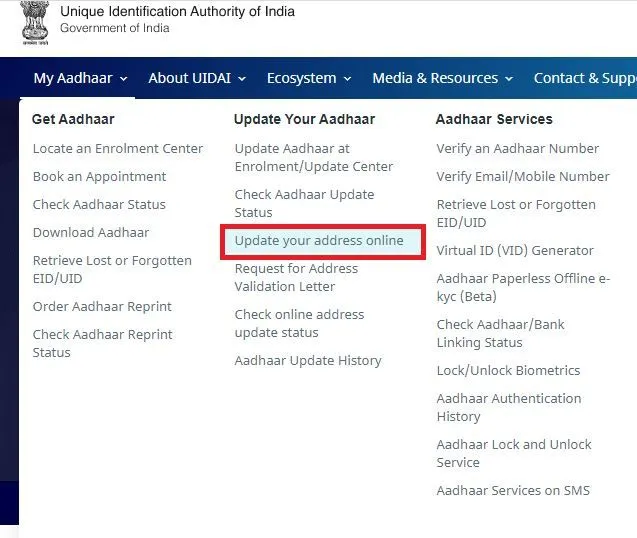
Step 4: If in case you have a valid address proof then click on the option ‘Update Address” or else select the option ‘Request for Address Validation Letter’.
Step 5: On selecting the option ‘Update Address’, a new window will open, here enter your 12 digit aadhaar number followed by captcha verification code which appears on the window and select either Send OTP or Enter a TOTP option to proceed further
Step 6: An OTP will be sent to the mobile number which is registered with the UIDAI database.
Step 7: Enter the OTP to login to the Aadhaar account
Step 8: If you choose the TOTP option, then tick the address option and click on the submit button.
Step 9: Enter your residential address as mentioned in the Proof of Address (PoA) and click on the “Submit Update Request” button
Step 10: If in case, if you want to modify your residential address, then click on ‘Modify’ option
Step 11: Tick the declaration and click on the “Proceed” option
Step 12: Select the appropriate document which you want to submit as PoA for verification and upload the scanned copies of the address proof and click on the ‘Submit’ button
Step 13: Proceeding further click on ‘Yes’ button and select the BPO service provider which will verify your given details and click on the submit button.
Step 14: The BPO service provider will inspect all the details mentioned in the form and will check if it matches with the POA and will forward the request to UIDAI. The updated request is accepted and an acknowledgement slip for the same will be provided to the applicant.
Note: The acknowledgement slip will have the Update Request Number (URN). After it gets updated, the aadhaar card holder can download the updated version and can take a print out of the aadhaar card.
Aadhaar Card Update Offline
Visiting an Enrollment Centre
The aadhaar cardholders can get all the necessary required details related to aadhaar update by visiting an aadhaar enrollment centre also.
Below is the procedure to do the same
Step 1: Visit the nearest Aadhaar Enrollment Centre
Step 2: Fill in the Aadhaar Correction Form
Step 3: Ensure that you fill in all the correct information and not the one which is mentioned in your existing aadhaar card
Step 4: Get a self-attested copy of all the documents or proofs which validate your updated request.
Step 5: Submit the form along with the relevant documents to the authorized aadhaar enrollment agents
Please Note: The applicant will have to pay in Rs 50 for every such visit to the Enrollment Centre for an update or correction. Any aadhaar cardholder can get all the details including the residential address, mobile number, image, biometric data and so on at any of the enrollment centres in India.
Aadhaar Card Update through Post
The aadhaar cardholder can get the details updated offline by sending the request through India Post to UIDAI.
Follow the below mentioned steps for Aadhaar Card Update:
Step 1: Visit the official web portal of UIDAI.
Step 2: Download the ‘Aadhaar Update /Correction Form’ under the Downloads section
Step 3: Fill in all the required details which you wish to change in your present aadhaar card.
Step 4: Take a photocopy of all the documents which will validate the changes requested to be made in the form.
Step 5: Sent the duly filled in form along with necessary photocopies of documents to the postal address as mentioned below: -
Address 1:
UIDAI,
Post Box No. 10,
Chhindwara,
Madhya Pradesh – 480001,
India
Address 2:
UIDAI,
Post Box No. 99,
Banjara Hills,
Hyderabad – 500034,
India
What details can be changed on the Aadhaar Card Update Online?
Though all the details available in the aadhaar card cannot be corrected or updated while updating online only residential address can be corrected or updated. If in case, if anyone wants to update the other details including Date of Birth, Name of the Applicant, Mobile Number and E-mail ID then one has to visit an Aadhaar Enrollment Centre.
Updating Address in Aadhaar Card
An applicant can get his/her address updated in the Aadhaar Card whenever he/she relocates to a new place. The address can be updated as many times as the person changes his or her address of residence. Follow the below-mentioned steps to change the address in Aadhaar card via online:
Step 1: Visit the UIDAI web site page
Step 2: Click on “My Aadhaar” and select ‘Update Address Online’ this will take you to a new web page – “Aadhaar Self Service Update Portal”
Step 3: Now enter your Aadhaar Number and click on Sent OTP
Step 4: Proceeding further enter the OTP and the security code
Step 5: Select the address option for updating the same
Step 6: Enter the current residential address and confirm it
Step 7: Select the relevant Proof of Address
Step 8: Proceeding further select the relevant BPO for authentication
Step 9: Your request will be submitted followed by generation of an Update Request Number (URN)
Updating Address in Aadhaar Card without Document Proof
Those who do not have a valid address proof can update their current residential address in Aadhaar by following the procedure as laid down by the UIDAI.
The new facility of “Address Validation Letter” allows the applicants to update their residential address in Aadhaar card through a validator. The address in the Aadhaar Card of the validator is updated in the applicant’s aadhaar after the successful completion of the process. Follow the below-mentioned steps to update the address in aadhaar using the Address Validation Letter:
The process consists of three steps
1. Application by the Applicant
2. Approval by the Verifier
3. Final Submission by the Applicant
1. Application by the Applicant
Step 1: Visit the UIDAI web portal
Step 2: Click on “My Aadhaar” and select ‘Update Address Online’ this will take you to a new web page – “Aadhaar Self Service Update Portal”
Step 3: In this page click on the option ‘Request for Address Validation Letter’
Step 4: Enter the Aadhaar Number followed by the Captcha Verification code and click on the button Send OTP or Enter a TOTP option
Step 5: Enter the address verifier’s Aadhaar number and click on the submit button
Step 6: Your request will be submitted to the verifier and you will receive a message on your registered mobile number
2. Approval By the Verifier
Step 1: The verifier gets an SMS which consists of OTP and a link to verify the applicant’s request on the mobile number which is registered with UIDAI
Step 2: Now you have to click on the link in the SMS and log in to the account
Step 3: Proceeding further enter the OTP which you receive in the space provided and confirm the request of the applicant
3. Final Submission by the Applicant
Step 1: Once the verifier approves off the request of the applicant, an SMS will be sent to the applicant on his/her registered mobile number with the SRN and the link to submit the application
Step 2: Now Enter the SRN and OTP which will be received through SMS
Step 3: Verify the details and click on ‘Submit Update Request’ to complete the process
Step 4: Once approved, the verifier’s address will be updated in the applicants Aadhaar Card.
Procedure for Aadhaar Card Name Change
For all the existing aadhaar card holders whose names are incorrect can get them modified to use it as a proof. This facility is helpful for those whose name differs in Aadhaar and in PAN card. This particular situation makes it difficult for them to link the Aadhaar with PAN. One has to follow the below-mentioned procedure to change the name in Aadhaar card:
Step 1: Visit the nearest Aadhaar Enrollment Center
Step 2: Fill in the Aadhaar Enrollment/Correction Form
Step 3: Mention your correct name in the form and recheck it once
Step 4: Submit the filled in form along with the relevant Proof of Identification
Step 5: The executive will register your updated request
Step 6: You will be receiving an acknowledgement slip for your update request
Note: One has to pay Rs 50 for availing this facility at any of the Aadhaar Enrollment Centers.
Changing Mobile Number in Aadhaar
The aadhaar card holders can change their mobile numbers which are registered with the UIDAI by following few easy steps as mentioned below:
Step 1: Visit the nearest Aadhaar Enrollment Center
Step 2: Fill in the Aadhaar Update Form
Step 3: Enter your existing mobile number in the form
Step 4: You need not have to mention your previous mobile number
Step 5: One has to provide a valid proof for updating the mobile number in the aadhaar card.
Step 6: An executive associated with Aadhaar will register your request.
Step 7: You will receive an acknowledgement slip which will contain the URN
Note: One has to pay around Rs 50 as a fee to avail the service.
Change Date of Birth in Aadhaar Card
The aadhaar cardholder has to visit the nearest aadhaar enrollment centre to change their date of birth on the card. One has to follow the below-mentioned steps to change the date of birth in the Aadhaar Card
Step 1: Visit the nearest Aadhaar Enrollment Center
Step 2: Duly fill in the Aadhaar update form by mentioning the date of birth on it (Do not mention the date of birth which is mentioned on the aadhaar card)
Step 3: Submit the filled in form along with relevant documents to the authorities.
Step 4: The aadhaar executive will take the Biometrics to authenticate the identity.
Step 5: Collect the acknowledgement slip from the authorities which will contain the URN on it.
Step 6: The URN can be used to check the Aadhaar Update status Online.
Please Note: One has to pay Rs 50 to the executive to avail the service. It will take around 90 days for the date of birth to get updated in the aadhaar card.
Required Documents for UIDAI Aadhaar Update
The following documents are required for updating or correcting the Aadhaar Card:
Proof of Identification (PoI) Documents Containing Name and Photo for Name Correction
- PAN Card
- Passport
- Election Voter Identification Card
- Driving Licence
- Ration or PDS Photocard
- Service Photo ID card issued by the PSU
- Licence of Arms
- Photo Identification Card issued by the Government of India
- Job Card of NREGS
- Photo identification issued by Recognized Educational Institution
- Photo Credit Card
- Photo Passbook of Kisan
- Marriage Certificate
- Residing address card of the applicant which contains both the name and photo that was originally issued by the Department of Posts.
- ECHS Photo Card
- Photo card of CGHS
- The document containing a proof of the marriage of the applicant issued by the Marriage Registrar.
- Handicapped medical certificate or a disability identification card.
- Identification certificate which includes a photo of the applicant on a proper letterhead and is issued by either Tehsildar or by a Gazetted Officer.
- Photo card of the Pensioner.
- Photo card of the Freedom Fighter
- Photo Bank ATM card
Documents Supporting Proof of Address (PoA) Required for Aadhaar Updating or Correction
- Passport
- Ration Card
- Driving Licence
- Passbook of the bank in which the applicant is an account holder
- Election Voter ID card
- Bank Statement in which the applicant holds an account
- PSU issued Service photo ID card
- A photo identification card issued by the government
- Account statement or passbook of the Post Office
- Last three months of electricity bill
- Last three months water bill
- Receipt of Property Tax
- Arms Licence
- Photo and a letter signed by the bank on letterhead
- Credit card statement for the last three months
- Insurance Policy
- Job card of NREGS
Supporting Documents for Proof of Date of Birth for Aadhaar Card Update/ Correction
- Certificate or SSLC Marks Card
- Birth Certificate
- Date of Birth Certificate on their letterhead issued by the Tahsildar or gazetted officer
- Passport of the applicant
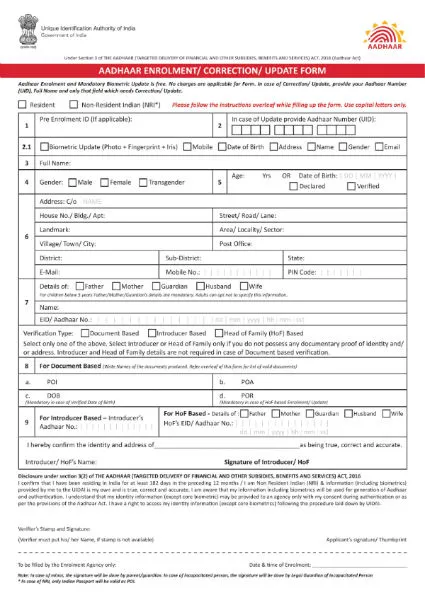
Aadhaar Update Form
Applicant can use this form, to submit the request for update or correction in the existing current Aadhaar Card.
Applicants are mandated to fill the form and send it to the UIDAI authority via post. In the aadhaar update form personal details can be changed such as name, phone number, aadhaar card number, address etc. Below given is the Aadhaar Update Form, scroll down and have a look.
Key Things be kept in mind while Updating Aadhaar Card Details
The following things should be kept in mind while updating or correcting Aadhaar card details:
- The required details should be filled out properly either in English or in the local language.
- The changes that an individual enters must be correct and accurate, supported by appropriate documents which an individual is submitting along with the enrollment form must be approved.
- If the aadhaar card holder, no longer has the registered mobile number with him then one should adopt the offline method for correcting the aadhaar card.
- One should make sure not to use any salutations or designations while writing the name of the holder in case of aadhaar card.
- Only required documents should be attached as a proof at the time of submitting an enrollment form to the concerned executive at enrollment centres.
- While correcting the Aadhaar card details, one must make sure that the update request number (URN) is kept safe as this will help the holder to check the Aadhaar update status at a later point of time.
- One should make sure that all the necessary information should be filled in properly and no option should be kept unattended.
- All the details entered in the correction form should be filled in capital letters.
- The corrected Aadhaar card will be sent to the address which is mentioned in the Aadhaar card and one should ensure that the cardholder should be present at the location for receiving the same.
- The photocopies of the documents which is sent by the card holder must be attested by the sender.
Procedure to Update/Change Name in Aadhaar Card
Aadhaar cardholders can update/change their numbers so that they can use it as evidence for some purpose. It is useful for those people who have different names in their PAN and Aadhaar which result in non-acceptance of both documents as a result of which it cannot be linked later. You can change your name in Aadhaar by visiting the nearest enrollment centre and follow the below-mentioned steps:
Step 1: Visit the Aadhaar Enrollment Center/Correction Form and Fill it.
Step 2: Please mention the correct name in the form
Step 3: Relevant proof of identity should be submitted along with the form
Step 4: Your update request will be registered by the executive
Step 5: Acknowledgement Slip will be given, for your updated request
Please Note: To avail this facility, you need to pay Rs.50
Procedure to Update/Change Mobile Number in Aadhaar Card
Due to some situations, the people will not be using the same mobile number that was registered with UIDAI at the time of the enrollment process.
So one has to follow the below steps to change or update mobile number in Aadhaar:
Step 1: Go to Aadhaar Enrollment/Update Center
Step 2: Duly fill the Aadhaar Update Form
Step 3: Enter your current mobile number in the form and do not mention your previous mobile number and note that there is no requirement to provide proof to update your mobile number
Step 4: Your request will be registered by the executive
Step 5: An Acknowledgement Slip will be handed over to you which contains URN (Update Request number)
Please Note: One has to pay Rs.50 to avail this service
Procedure to Change the Date of Birth (DoB) in Aadhaar Card
Please follow the below steps to change your date of birth in Aadhaar Card:
Step 1: Go to Aadhaar enrollment centre
Step 2: Duly fill the Aadhaar update form by mentioning your date of birth correctly
Step 3: Note that you do not have to mention the date of birth which is printed on the card
Step 4: Submit the date of birth proof along with the form
Step 5: To Authenticate your identity the Aadhaar Executive will take your Biometrics
Step 6: The Acknowledgement Slip which contains URN (which can be used to check your Aadhaar update status through online) will be handed over to you.
Please Note: You need to pay Rs. 50 as a fee to the Aadhaar executive. The date of birth of the applicant will be updated in aadhaar database within 90 days.
Why does the request for Aadhaar Card Correction or Update gets rejected?
Rejections of Aadhaar card by UIDAI is mainly done due to lack of correct information. But there is no need to worry because one can update correct information by visiting the Aadhaar Enrollment Center and also through its online official website.
Reasons for rejections of Aadhaar Card:
1. When people forget to upload the self-attested copy of the document
2. When people do not provide valid documents
3. Incorrect Mobile and Aadhaar information
4. Documents are not in name of the applicant or Resident
5. PoA (Proof of Address) / POI (Proof of Identity) / document are not uploaded properly
6. Due to Transliteration error
7. Details provided in the form may not match the details provided in documents
8. Your Biometric data may not be captured correctly
9. Your fingerprints might not be captured properly
10. Due to technical reasons
FAQ's
Q. How can we update demographic details in Aadhaar Online?
A. You can update your demographic details like name, address, date of birth, gender, mobile number and email through online Self-Service Update Portal (SSUP).
Q. Is it possible to update Aadhaar card address online?
A. Yes, you can update Aadhaar card address online. Moreover, you can update all other details by visiting the nearest Aadhaar Enrollment Center.
Q. What are the eligibility criteria for Aadhaar?
A. The eligibility criteria for Aadhaar are as follows:
1. The person should be above the age of 3 years
2. The person has to be an Indian Resident
3. Non-Resident Indians are also eligible
4. Foreigners are also eligible for enrollment
Q. Is it compulsory to provide C/O details in Address for Aadhaar?
A. No, it is not compulsory. C/O details in Address is used for letter delivery purpose.
Q. Can we change the date of birth more than one time in Aadhaar card?
A. As per the notification, the date of birth of resident can be updated only once. But in case it has to be updated more than one time, then through an exception handling process, the resident may require to visit the regional office of the UIDAI and get it updated.
Q. What are the documents needed to update the Aadhaar address?
A. You can submit a scanned and self-attested image of any of these documents which include both your name and address and these are as follows:
1.
Driving Licence
2. Voter ID card
3. Ration Card
4. Passbook or Bank Statement
5.Passport
6.Any photo ID card issued by government or PSU' s
7. Insurance policy
8. Electricity bills, Water bills, Gas bills, Telephone landline bills(Not older than 3 months)
9. Property tax receipt, Credit card statement (Not older than 3 months)
10. Registered sale, lease or rent document
11. For Married Women, they can submit their husband aadhaar as proof of Address
12. For Minors, they can submit their parent's aadhaar card
Q. How can I verify my Aadhaar card linked to a ration card?
ANS: To check if your Aadhaar card is linked to a ration card, you must submit a copy of your Aadhaar card along with the photocopy of your ration card to the nearest PDS store. Finger biometrics will be performed to authenticate and verify your identity with the Aadhaar card.
Q. How do I change my cell phone number in a ration card?
ANS: To change your mobile number into a ration card, you need to follow the steps mentioned below:
Visit the official state government PDS portal.
Enter your ration card number
Enter your registered mobile number
Click on the "Submit" button
You will receive an OTP, enter the OTP to continue
After verification, a reference number/acknowledgement number will be displayed
Your request to update/modify your number will be submitted
Q. How do I link my bank account to a ration card?
ANS: You need to go to the nearest bank branch to link your bank account to a ration card.
Q. How to download my duplicate ration card with an Aadhaar card?
ANS: Currently, there is no such procedure for downloading your ration card with an Aadhaar card.
Latest Updates
- Aadhaar Card Centres in Bangalore
- Aadhaar Card Centres in Chennai
- Aadhaar Card Centres in Delhi
- Aadhaar Card Centres in Mumbai
- Aadhaar Card Centres in Kolkata
- Aadhaar Card Centres in Hyderabad
- Aadhaar Card Centres in Pune
- Aadhaar Card Centres in Vadodara
- Aadhaar Card Centres in Trivandrum
- Aadhaar Card Centres in Jaipur
- Aadhaar Card Centres in Lucknow
- Aadhaar Card Centres in Ahmedabad
- Aadhaar Card Centres in Coimbatore
- Aadhaar Card Centres in Vizianagaram
- Aadhaar Card Centres in Madurai
- Aadhaar Card Centres in Patna
- Aadhaar Card Centres in Nagpur
- Aadhaar Card Centres in Chandigarh
- Aadhaar Card Centres in Surat
- Aadhaar Card Centres in Bhubaneswar
- Aadhaar Card Centres in Mangaluru
- Aadhaar Card Centres in Visakhapatnam
- Aadhaar Card Centres in Nashik
- Aadhaar Card Centres in Mysore
- Aadhaar Card Centres in Indore
- Aadhaar Card Link to Mobile Number
- Linking Aadhaar with Bank Account
- EPF Aadhaar Linking
- Link Aadhaar to LPG
- Linking Aadhaar with PAN Card
- Link Aadhaar to Ration Card
- Aadhaar PVC Card
- How to Link Aadhaar to PM Kisan Samman Nidhi?
- Aadhaar Card Status
- Aadhaar Card Services
- How to Download e- Aadhaar Card through Aadhaar Face Authentication
- Aadhaar Card KYC
- Aadhaar Authentication History
- Aadhaar Card Download
- Aadhaar Enabled Payment Systems
- Link Aadhaar to Mutual Funds
- How to Link Aadhaar with NPS Account
- Aadhaar Card Correction Form
- Procedure to Lock And Unlock Aadhaar Biometrics Data
- Aadhaar For Kids
- mAadhaar
- Aadhaar Card Update
- Aadhaar Virtual ID
- Duplicate Aadhaar Card
- How to link Aadhaar with IRCTC Account?
- UIDAI
- Key Problems Associated with Aadhaar Card
- Linking Aadhaar Card to Different Documents
- Linking Aadhaar with Caste Certificates
- Linking Aadhaar with Driving Licence
- Jio Aadhaar Linking Procedure
- Linking of Aadhaar Number with BSNL Mobile Number
- Procedure to link Aadhaar with LIC Policy
- Procedure to link Aadhaar with SBI Life Insurance Policy
- Linking of Aadhaar Card with Vodafone Number
- Linking of Aadhaar Card with Airtel Number
- Aadhaar Card Customer Care Number
- Procedure to Lodge Aadhaar Related Complaints
- Aadhaar Card For Non-Resident Indians(NRIs)
- Aadhaar Card Application Form
- Seeding Aadhaar Number with Demat Account
- Aadhaar Card Password
- Gold Rate Calculator
- 7th Pay Calculator
- 8th Pay Calculator
- NPS Calculator
- PF Calculator
- Gratuity Calculator
- Income Tax Calculator
- Bank FD Calculator
- Bank RD Calculator
- Bank FD Interest Rate
- Bank RD Interest Rate
- EMI Calculator
- Home Loan EMI Calculator
- Personal Loan EMI Calculator
- Car Loan EMI Calculator
- SIP Calculator
- GST Calculator
-
 Infosys ADR Trading Briefly Halted After Massive 40% Rally, Wipro ADRs Surge; What’s Fueling the Rally?
 -
 Upcoming Dividend Record Date: Canara Robeco Share To Pay 15% Dividend To Shareholders; How To Get Eligible?
 -
 ICICI Prudential vs HDFC vs Nippon Life India: Can The Newly Listed AMC Outshine Its Peers? Check Target Price
 -
 Nagaland Sambad 8 PM Evening Dear Friday Weekly Lottery Result LIVE on 19 December 2025: Check Winners List
 -
 RRP Semiconductor Share Jumps Over 55,000 Per Cent in 20 Months, Triggers Investor Warnings
 -
 How a Year-End Debt Check Help Families Enter New Year Stress-Free
 -
 Buying Apple iPhone 17? Price Hike Rumours Hint at Rs 7,000 Increase in India | What We Know So Far
 -
 No Entry for Non-BS-VI Vehicles in Delhi From Noida, Gurugram, Ghaziabad: How to Check & Renew PUC Certificate
 -
 RBI MPC Minutes: Governor Voted for Rate Cut Considering Benign Inflation, Trade Talks Can Boost Growth
 -
 It’s A Boy For Bharti Singh, Haarsh Limbachiyaa! Couple Welcomes Baby After On-Set Emergency ; Check Net Worth
-
Block for 8 hours
-
Block for 12 hours
-
Block for 24 hours
-
Don't block

 Sign in with Google
- Male
- Female
- Others
- Under 18
- 18 to 25
- 26 to 35
- 36 to 45
- 45 to 55
- 55+